NEWPromptev MCP Server — One URL. Every tool. Your team’s knowledge. Connect Claude Code, Cursor, or any MCP client.

Privacy-first, context-aware AI

Give your team AI that knows your company — without giving your company away.

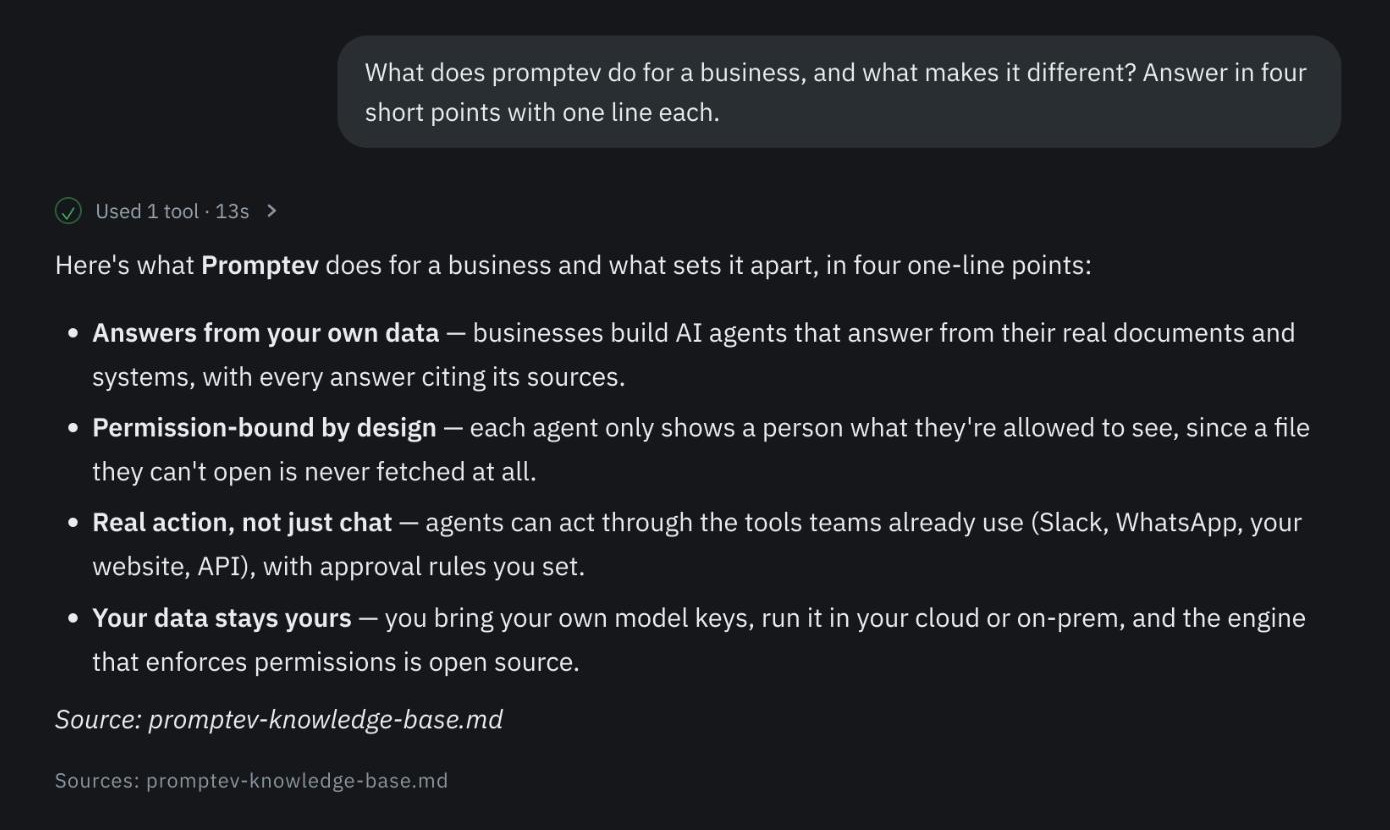
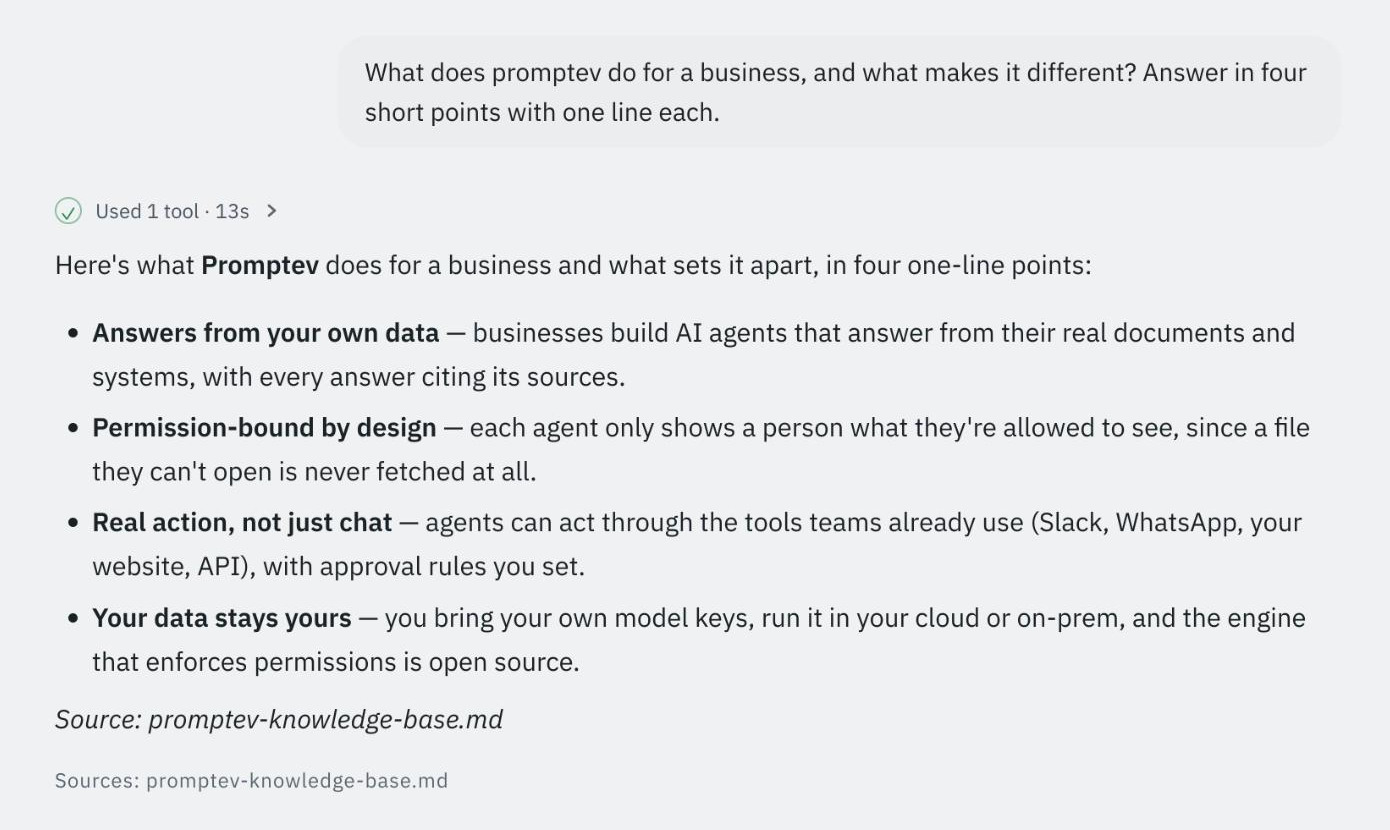
Your people are already asking AI about work. Today they paste your documents into tools you do not control. Promptev gives them something better: assistants that know your files, answer with sources, and do the work — where each person only ever sees what they could open anyway. On your models, your data, your infrastructure.

2,500 free credits · no card · your own model keys

Who can see what
Exactly what they could open
Where your data lives
Ours, your cloud, or your own servers
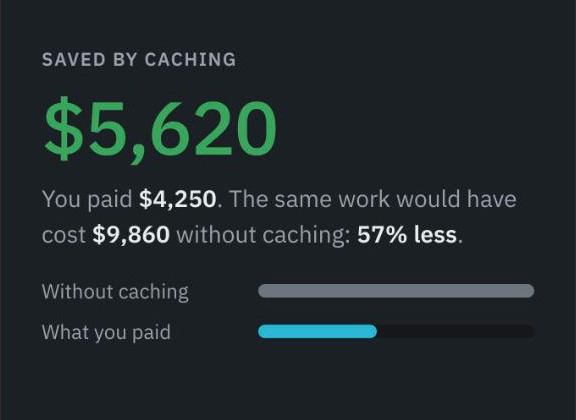
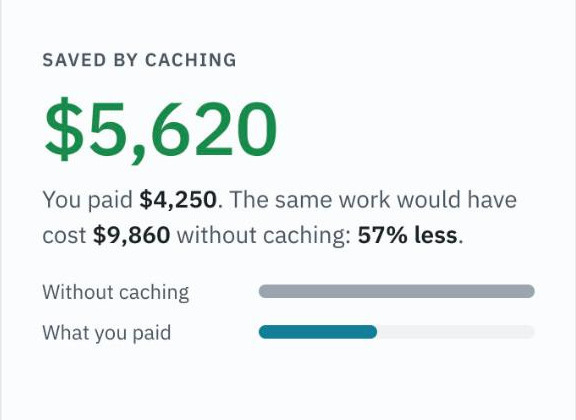
What it costs
No seats. Pay for work done
Time to a real answer
This afternoon

Why this is urgent

It is already happening. Just not on your terms.

Nobody is waiting for permission. People are pasting contracts, board packs and customer data into whatever assistant is open in the next tab, because it saves them an hour and the alternative is asking a colleague who is in a meeting.

Banning it does not work; it moves it out of sight. The only thing that works is giving people something better, on your side of the fence.

  • The knowledge stays inside. Your documents are read where you keep them, on your own infrastructure if you choose.
  • Everyone gets a different answer, correctly. The finance director and the contractor ask the same question and each gets what they are entitled to.
  • You can see what happened. Every answer names its sources; every action an assistant takes is recorded.
#ask-hr · Tuesday, 09:14

How many days of parental leave do I get, and who signs it off?

Twenty weeks at full pay, after twelve months’ service. Your line manager approves it, and People Ops is notified automatically.Parental leave policy 2026 · §3Employee handbook · p.18

Can you start the request for October?

create_request · waiting for your manager’s approval

The same assistant, asked in Slack, by someone who has never opened Promptev.

What it does, in three steps

Your files and tools go in. Answers and work come out.

No migration and no new place to log into. Promptev reads the systems you already pay for, and puts the assistants where your team already talks.

  1. 01 · POINT IT AT YOUR STUFF

    Choose what it may read

    A Drive folder, a SharePoint site, a Confluence space, a Jira project, a Dropbox, a database, or files you upload. Whatever a person could open, it can read — including scanned pages and spreadsheets.

    Google WorkspaceMicrosoft 365DropboxConfluenceJiraAzure DevOpsSlackDatabasesUploads
  2. 02 · SAY WHAT IT SHOULD DO

    Describe the assistant

    In plain words: “answer HR questions from the handbook”, or “review this month’s invoices and flag anything odd”. Give it the knowledge it may use, and set each tool to one of three: no approval, ask once in a conversation, or always ask.

    ReadsHandbook · Policies
    Can answer questionsno approval
    Can file a ticketask once
    Can send e-mailalways ask
  3. 03 · PUT IT WHERE PEOPLE ARE

    Your team just asks

    In the browser, in Slack, in WhatsApp, in a chat box on your website, or inside your own software. Answers come back with the documents they came from, so anyone can check them.

    BrowserSlackWhatsAppYour websiteYour codeOn a schedule

And the part that makes it safe to switch on. Everyone asks the same assistant, but nobody gets an answer from a document they could not have opened themselves. That is decided as the question is answered, not by tidying up afterwards — which is why finance figures stay with finance while everyone else still gets a useful reply.

And the list does not end at sixteen

Sixteen services ready. An open edge for the rest.

Eight apps arrive connected — 16 services and 198 tools between them, because Google Workspace is Drive, Docs, Sheets, Slides, Gmail and Calendar, not one connector. Everything else reaches Promptev by one of three routes, and none of them waits on us to build anything.

HTTP tools

ANY REST API

Point Promptev at any REST or HTTP API — an internal service, a partner endpoint, a product with no ready-made connector — describe its inputs, and it becomes a tool an agent calls under the same approval rules and the same audit trail as every built-in one. Not second-class.

Internal servicesPartner APIsApprovalsAudited

Database tools

EIGHT ENGINES

Agents query your databases in plain language and hand back tables or charts. Read-only by default, and you choose which schemas and tables are even visible.

PostgreSQLMySQLMariaDBSQL ServerOracleSQLiteClickHouseSnowflake

Custom MCP servers

BOTH WAYS

Attach any Model Context Protocol server you run or trust and its tools appear beside the built-in ones. It works the other way too: each project is itself an MCP server at its own URL, so any MCP-speaking developer tool gets that project's knowledge and tools with the caller's permissions intact.

Attach a serverProject as a serverScoped keys

The difference in ten seconds

Same question. Two people. Two answers.

Here is that promise, in practice: one assistant, one question, two people with different access. Anything that retrieves first and filters afterwards has already read the document. Promptev decides while it looks, so the wrong document is never fetched.

Full access
Nadia, Finance Directormember of finance-leads

What did we pay Northwind in Q2, and is the renewal signed?

You paid Northwind $184,200 across four invoices in Q2. The renewal was countersigned on 12 June at a 6% uplift, effective 1 July.

invoices-q2.xlsxNorthwind MSA 2026.pdf#finance
Scoped access
Tom, Contractorproject member · no finance groups

What did we pay Northwind in Q2, and is the renewal signed?

I can’t see finance records for Northwind. From the project wiki: the integration is live and the renewal was announced as signed on 12 June. For amounts, ask the finance team.

Project wikiinvoices-q2.xlsx — never fetchedNorthwind MSA 2026.pdf — never fetched

Why this matters. Anything retrieved and then filtered has already been read, and it leaks into “related” answers, summaries and follow-ups. Here the finance files are never fetched for Tom, and the agent says so instead of guessing.

The context engine

The part that decides what the AI is allowed to know.

Every agent on Promptev reads through one engine. It turns documents, scans, spreadsheets and messages into searchable knowledge, keeps who-may-see-what attached to every piece, and hands the model only what the person asking could open themselves — with the sources to prove it.

  • Reads PDFs, Office files, scans through a vision model, tables, wikis, tickets and chat history.
  • Full-text, trigram, vector and graph legs fused into one ranking. Every one of them compiles through one scope predicate, which is why a document someone may not open is never retrieved for them by any route.
  • Redaction runs before embedding. Permissions decide who, redaction decides what.
  • Your embedding and vision models, your Postgres, your bucket. Inside Promptev, or on its own as a library in Python or TypeScript over one schema.
Apache-2.0pip · Pythonnpm · TypeScript
How the engine works →
  1. 1ConnectDrive, SharePoint, Dropbox, Confluence, Jira, Azure DevOps, databases, uploads. Permissions travel with the content.SYNC · WEBHOOKS
  2. 2ExtractText, tables and layout. Scanned pages read by a vision model. Sensitive data masked here, first.OCR · REDACT
  3. 3IndexChunked and embedded with your model. Full-text, trigram and vector — plus a knowledge graph when you switch it on.HYBRID · GRAPH
  4. 4Retrieve, as the person askingThe caller’s identity and groups are in the database query. Out of reach means never fetched.SCOPE IN THE PLAN
  5. 5Ground and answerThe model sees only what was retrieved; every answer carries the documents it came from.SOURCES · AUDIT

The Promptev App

One place to build agents, and to talk to them.

Promptev is a product your whole team opens, not only an API. Owners and admins set up the workspace. Editors build agents. Viewers simply talk to them.

Agents in Finance

Invoice review

LIVE

Reads the month's invoices, flags anomalies, drafts Jira tickets. Asks finance before filing.

DriveSheetsJiraSlackgpt-5

Policy Q&A

LIVE

Answers staff questions from the handbook and the policies each person is cleared to read.

SharePointWhatsAppAppclaude-sonnet-4.5

Weekly case report

SCHEDULED

Every Monday 07:00: compiles the week's case notes and posts the report to #finance.

ScheduleConfluenceSlackOrchestration

Vendor lookup

LIVE

Looks up a supplier across the ERP database and the contracts. Read-only, nothing to approve.

PostgresDriveMCP

Support (website)

LIVE

Embedded on the pricing and docs pages. Grounded in product docs and the customer's own account.

EmbedDocsPostgres

Month-end close

DRAFT

A team of three agents on the canvas: reconcile, review, report. Pauses for approval before posting.

OrchestrationApproval
Agent directory

Every agent in a project, who built it, where it answers, live or draft.

Chat with sources

Files, voice notes and images in; answers with the documents they came from.

Knowledge

Connect a source or upload. Per-file sync, live progress, OCR for scans.

Tools & MCP

Connector tools, HTTP tools, database tools and your own MCP servers.

Orchestrations

Teams of agents on a canvas. Schedules, webhooks, retries, pause for approval.

Approvals inbox

Approve in the App, by e-mail or in Slack. Expires if nobody answers.

Members & roles

Owner, admin, editor, viewer, plus project roles. SSO groups become access rules.

Audit trail

Every change and every run, who did it, readable by a person, exportable.

Channels

Slack, WhatsApp, your website, a portal, the API. One agent, every door.

Notifications

Approvals, held runs, connectors needing attention, credits. In the App and by e-mail.

Credits & billing

Pay as you go, auto top-up, receipts, invoices when you need them.

API keys & embed

Scoped keys per project. A widget on your site with one script tag.

Everything in the App →

Inside a workspace

Your sources, your agents, your people. One map.

A workspace is the wall around your data. Inside it, projects hold knowledge, agents and tools. Documents flow in from the places they already live, pass the permission gate as each person asks, and answers flow out to wherever the team is.

  • Documents syncing in
  • Retrieval through the permission gate
  • Agents working as a team
  • Answers to the channels
  • Tools an agent calls — no knowledge
  1. 01Sources

    It reads where you already work

    Eight apps — Google Workspace, Microsoft 365, Dropbox, Confluence, Jira, Azure DevOps, Slack, WhatsApp — which are sixteen services and 198 tools once the sub-services are counted. Plus anything you upload.

  2. 02Knowledge

    Turned into something searchable

    A project holds several knowledge bases, each with its own sources. Text, tables and layout are extracted, scans are read by a vision model, and every piece keeps the permissions it arrived with.

  3. 03The gate

    Retrieved as the person asking

    The caller's identity and groups are part of the database query, so a document they could not open is never fetched in the first place.

  4. 04Agents

    They answer, and they act

    One agent, or a team of them on a canvas, running on a schedule or a webhook — stopping for a person before anything that matters. HTTP, database and MCP tools attach here: they give an agent something to call, never a corpus to read.

  5. 05Channels

    Wherever your team already talks

    The Promptev App, Slack, WhatsApp, a chat box on your site, a branded portal, your own code over the API or MCP.

Integrations

Sixteen services. 198 built-in tools. Unlimited via HTTP, MCP and your databases.

Eight apps to connect — Google Workspace, Microsoft 365, Dropbox, Confluence, Jira, Azure DevOps, Slack and WhatsApp. They are sixteen services once the sub-services are counted, because Google Workspace is Drive, Docs, Sheets, Slides, Gmail and Calendar rather than one connector. Everything else your company runs reaches Promptev by one of three open routes.

OneDrive31 toolsAzure DevOps22 toolsDropbox19 toolsGoogle Drive16 toolsJira16 toolsGmail14 toolsOutlook13 toolsSlack12 toolsConfluence10 toolsOutlook Calendar9 toolsGoogle Sheets7 toolsGoogle Slides7 toolsGoogle Calendar7 toolsGoogle Docs6 toolsSharePoint5 toolsWhatsAppchannelHTTP toolsany REST APIDatabase tools8 enginesCustom MCP serversboth ways

Sixteen ready, and an open edge for the rest: HTTP tools, database tools and your own MCP servers reach anything with an interface, under the same approval rules and the same audit trail as a built-in one.

Google API Services · Limited Use

Promptev connects to your Google Drive, Gmail, Google Calendar, and Google Sheets via OAuth. Only files and folders you explicitly select are indexed so your AI agents can search and reference them. Every tool action can require human approval before execution. Promptev is bring-your-own-key — your data is processed by the model provider you choose with your own API keys and is never used by Promptev to train any model. You can revoke access at any time from your Google account settings.

What teams build

Real work, with a human where it matters.

Agents read, decide and act through the same tools your people use, and stop to ask before anything that costs money or leaves the building.

Finance

Invoice review

Reads the month’s invoices, flags anomalies, drafts the Jira tickets, asks finance before filing.

DriveSheetsJiraAsk once

Month-end close

A team of three agents on a canvas: reconcile, review, report. Pauses for a person before anything posts.

OrchestrationScheduleAlways ask

Spend questions

“What did we spend with Northwind last quarter?” answered from the ledger database, as a table or a chart.

DatabasePostgresRead-only

Legal & compliance

Contract review

Reads an incoming contract against your playbook and flags the clauses that differ from your standard.

DriveSharePointVision

Policy Q&A

Answers staff questions from the handbook and the policies each person is actually cleared to read.

ConfluencePermissionsPortal

Vendor due diligence

Pulls a supplier’s documents together and drafts the review pack from your template.

DropboxDocgenApproval

Engineering

Incident context

When an alert fires, gathers the runbook, the recent changes and the open tickets into one Slack message.

Azure DevOpsConfluenceSlackWebhook

Release notes

Turns the week’s merged work into notes a customer can read, posted where the team already is.

Azure DevOpsJiraSchedule

In your editor

Your project’s knowledge and tools inside any MCP client, with the caller’s permissions intact.

MCPPermissions

Support

Website support

On your site, grounded in the product docs and each customer’s own account data, nothing else.

EmbedPostgresPermissions

Ticket triage

Reads an incoming ticket, finds the matching history and drafts the reply for a human to send.

JiraConfluenceAsk once

Escalation brief

Summarises everything known about an account before the call, in one page.

HTTP toolDriveOutlook

People

Onboarding answers

New hires ask in WhatsApp; the agent answers from the handbook and the policies they are cleared for.

WhatsAppConfluencePermissions

Interview scheduling

Finds a slot everyone can make and sends the invitation, once a person approves it.

CalendarGmailAlways ask

Revenue & ops

Account brief

Everything the team knows about an account — documents, mail, the CRM — gathered before the meeting.

DriveOutlookHTTP tool

Weekly report

Every Monday at 07:00, compiles the week’s numbers and posts the report to the team channel.

ScheduleDatabaseSlackOrchestration

None of these is a template. They are the same agent builder with different instructions, different knowledge and different tools — which is why anything not listed here is a configuration task rather than a feature request: any REST API becomes a tool, any of eight database engines can be queried, and any MCP server can be attached.

Privacy first, in the literal sense

Nothing here is ours to keep.

Bring your own models and keys, your own storage, your own database, your own connector apps. Run it managed by us, in your cloud, or fully on your premises.

  • Model calls go to your provider on your own credentials — chat, embedding and OCR alike. Promptev does not sell model tokens. Switch model or provider without changing what you built; a self-hosted or OpenAI-compatible endpoint of your own works too.
  • Files, embeddings and the knowledge graph live in a database and a bucket you can point anywhere.
  • The engine is open source under Apache-2.0. Read it, audit it, run it alone.
ModelsOpenAI, Anthropic, Gemini, Azure, self-hostedYour keys, your billing, your data termsyours
ConnectorsGoogle Workspace, Microsoft 365, Dropbox, Confluence, Jira, Azure DevOps, Slack, WhatsAppOur apps for a quick start, or your own registered appsyours or ours
StorageAttachments and generated filesOur bucket with quota and retention, or your S3, GCS or Azureyours or ours
DatabasePostgres with per-tenant row securityManaged, in your cloud, or on-premisesyours or ours
EnginePermission-aware retrievalThe part that decides who sees whatopen source

Governance

Built in, not bolted on.

Roles decide who may build, who may only talk to agents, and who approves. Every action an agent takes lands in an audit trail a person can read. Nothing that spends money or writes to your systems happens without the rule you set.

No approval
The tool runs on its own. Right for reading.
Ask once
The first call in a conversation stops for a person. Once approved, the rest of that conversation runs without asking again — and a denial grants nothing.
Always ask
Every call stops, however many there are.
  • Owners, admins, editors and viewers, plus project-level roles. Who may build, who may only talk to agents, who approves. A viewer costs nothing, so the whole company can have one. SSO groups become access rules.
  • An admin’s rule is the floor. Attaching a tool to an agent can tighten the approval it arrived with — never weaken it.
  • Requests are answered in the App, by e-mail or in Slack, and they expire rather than waiting forever.
  • SOC 2 Type II. Every change and every run in the trail, readable by a person and exportable. Notifications where you already are.

None of this is a feature you switch on. Roles, the audit trail and the approval rules belong to the workspace — every agent in every project runs inside them.

Where Promptev sits

You will be asked how this compares. Here is the honest answer.

Enterprise search, a suite copilot, a developer framework, or a pipeline you build yourself. Each is good at something. Promptev is the context engine and agent platform that retrieves as the person asking, acts through governed tools, and runs where you decide.

Promptev and Glean

Enterprise search

Glean is a serious product — hundreds of connectors, many models, and permission-aware access built in. Promptev differs on pricing shape and on where it runs: no seats and no minimum, and a workspace can run on its own database, its own models and its own storage, with the engine that enforces the permission boundary open for you to read.

Promptev and Microsoft Copilot

Suite copilots

Excellent inside Microsoft 365. Promptev spans Google Workspace, Microsoft 365, Dropbox, Confluence, Jira, Azure DevOps and your databases, and answers in Slack, WhatsApp, your own site and MCP clients. If you live entirely inside Microsoft 365, Copilot is a fine start and Promptev can sit beside it.

Promptev and developer frameworks

LangChain, LlamaIndex

Frameworks give developers the parts to build a pipeline. Promptev ships the finished platform: connectors, a permission-aware context engine, agents, approvals and audit. Use them together through MCP — a project URL is an MCP server.

Promptev and building it yourself

Your own RAG pipeline

You own every line, and every incident. The context engine is open source under Apache-2.0, so take the engine alone or the whole platform — and keep the freedom to leave.

For builders

One URL per project. Every tool. Your team's knowledge.

Promptev is an MCP server, a REST API and an open engine. Point Claude Code, Cursor or your own agent at a project and it gets that project's permission-aware knowledge and its governed tools, exactly as your people do — no more.

Orchestrate teams of agents that run on a schedule or a webhook, pause for approval, and pick up where they left off. Or skip the platform entirely and call the engine as a library: two clients, either language, one Postgres schema between them.

$ pip install promptev-context-engine$ npm install @promptev/context-engine
mcp.json
{
  "mcpServers": {
    "promptev": {
      "url": "https://app.promptev.ai/mcp/acme/ops",
      "headers": { "Authorization": "Bearer pk_…" }
    }
  }
}
// one server per project (acme / ops)
// search_knowledge_base · call_tool · call_agent — scoped to the key's grants

Pricing

Pay for what your agents do. Nothing else.

Pay as you go

From $5no seats · no plan

Buy credits when you need them, use your own model keys, and pay only for what your agents do. Enterprise is an annual licence with a custom deployment — in your own cloud account or on your own premises — plus single sign-on, audit exports and support, sized to the estate rather than to a seat count.

Plain answers

The questions people ask before they sign up.

What is a context engine?

The part of an AI system that turns your documents, spreadsheets, scans and messages into retrievable knowledge and decides what the model is allowed to see for each request. Promptev’s context engine is open source under Apache-2.0 and carries the caller’s permissions into the retrieval query itself.

What is permission-aware (ACL-aware) retrieval?

Retrieval where the person’s identity and groups are part of the database query, so documents they cannot open are never fetched, rather than fetched and filtered afterwards. It is the difference between an AI you keep to one team and one you can put in front of contractors.

What is agentic AI, and how is it different from a chatbot?

A chatbot answers. An agent reads, decides and acts through tools: it files the ticket, creates the folder, sends the report, on a schedule or when asked. On Promptev every tool is set to one of three — no approval, ask once (the first call in a conversation stops for a person, then the rest of that conversation runs), or always ask — and every action lands in an audit trail.

Do you integrate with the tool we use?

Sixteen services across eight apps arrive ready, with 198 tools between them. Beyond those there are three open routes, and none of them waits on us. HTTP tools: point Promptev at any REST or HTTP API, describe its inputs, and it becomes a tool an agent calls under the same approval rules and the same audit trail as a built-in one. Database tools: agents query your databases in plain language and hand back tables or charts — PostgreSQL, MySQL, MariaDB, SQL Server, Oracle, SQLite, ClickHouse and Snowflake — read-only by default, and you choose which schemas and tables are even visible. Custom MCP servers: attach any Model Context Protocol server you run or trust and its tools appear beside the built-in ones. It works both ways: each project is itself an MCP server at its own URL, so any MCP-speaking developer tool gets that project’s knowledge and tools with the caller’s permissions intact.

Is Promptev an alternative to Glean or Microsoft Copilot?

Glean is a serious product — hundreds of connectors, many models, and permission-aware access built in. Promptev differs on pricing shape and on where it runs: no seats and no minimum, and a workspace can run on its own database, its own models and its own storage, with the engine that enforces the permission boundary open for you to read. If you live entirely inside Microsoft 365, Copilot is a fine start and Promptev can sit beside it.

Can I use Promptev with Claude Code, Cursor or my own code?

Yes. Every project is an MCP server: one URL gives any MCP client that project’s permission-aware knowledge and governed tools, with the caller’s permissions intact. The context engine is also a library you can call directly — pip install promptev-context-engine for Python, npm install @promptev/context-engine for TypeScript — and both clients share one Postgres schema, so a corpus ingested by either is searchable by the other.

Where does my data live?

Managed by Promptev, in your own cloud, or fully on-premises. Model calls go to your provider on your own keys — chat, embedding and OCR alike — so switching model or provider does not change what you built. Files, embeddings and the knowledge graph live in a database and a bucket you can point anywhere. SOC 2 Type II.

How much does it cost?

Pay as you go from $5, with 2,500 free credits and no card to start. There are no seats: you pay for what your agents do, on your own model keys. Enterprise is an annual licence with a custom deployment in your own cloud account or on your own premises, plus single sign-on, audit exports and support — sized to the estate, not to a seat count.

Talk to a person

Tell us what you are trying to do. We answer ourselves.

A question about running it in your own cloud, a connector you need, a security review to get through — write it here and it reaches the team directly, not a queue.

Start here

Connect one source. Ask one question. See who gets what.

Two thousand five hundred free credits, no card. Or talk to us about running it where your data already lives.

2,500 free credits · No card required · No subscription