Engineering
context-engine 1.0: an open-source retrieval library with permissions inside the query
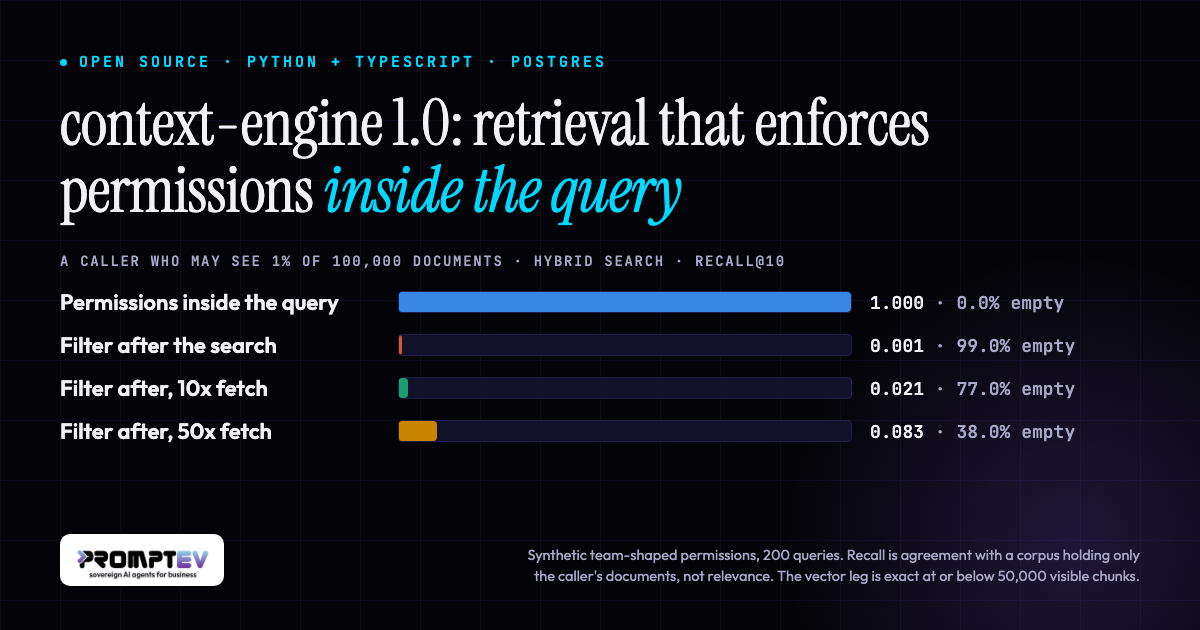
If you filter search results by permission after the search has run, callers with narrow access get short or empty results, and nothing tells you. The search spends its limit on rows the caller may not see, the filter removes them, and what is left looks like “no relevant documents found”. context-engine 1.0 is an open-source retrieval library, in Python and TypeScript, that puts the permission check inside the SQL of every built-in retrieval leg that searches Postgres instead.
This post gives the measured difference and the conditions it was measured under, says what ships in 1.0, and lists what the benchmarks do not show.
Retrieval permissions, measured
The benchmark compares four ways of answering the same search for a caller who may see 10% or 1% of a corpus:
- Permissions inside the query.
engine.search(query, top_k=10, principals=[the caller's group]). The predicate runs inside each leg’s SQL. - Filter after, same limit. The same search with no permissions, then the top 10 filtered to what the caller may see.
- Filter after, 10x fetch. A search with
top_k=100and no permissions, filtered, cut to 10. - Filter after, 50x fetch. The top 500, filtered, cut to 10. A leg returns 500 candidates at most, so this is the deepest fetch measured.
The reference is the same search, with the same settings, on a copy of the database that holds only the documents the caller may see. Index scans are switched off on that copy, so its vector leg is an exact scan. Recall@10 is the share of the copy’s top ten a method returned. “Empty” is the share of searches where a method returned nothing although the copy had results.
Hybrid search at the shipped defaults, 200 searches per row:
| Sees | Method | Recall@10 | Empty |
|---|---|---|---|
| 10% | Permissions inside the query | 1.000 | 0.0% |
| 10% | Filter after, same limit | 0.084 | 63.5% |
| 10% | Filter after, 10x fetch | 0.419 | 13.0% |
| 10% | Filter after, 50x fetch | 0.638 | 1.0% |
| 1% | Permissions inside the query | 1.000 | 0.0% |
| 1% | Filter after, same limit | 0.001 | 99.0% |
| 1% | Filter after, 10x fetch | 0.021 | 77.0% |
| 1% | Filter after, 50x fetch | 0.083 | 38.0% |
The 95% bootstrap intervals of the filter-after rows, in table order, are [0.065, 0.103], [0.375, 0.470] and [0.598, 0.679] at 10%, and [0.000, 0.003], [0.012, 0.033] and [0.063, 0.106] at 1%. The first row of each group has an interval of no width, because no search disagreed with the reference. With 200 searches and no disagreement, up to 1.5% of searches could still differ (the rule of three).
With the predicate in the query, the engine returned the same ten results as the visible-only copy on every one of the 200 searches, at both visibility levels. That comparison is of the set of ten, not of their order. Filtering afterwards returned nothing for 63.5% of searches at 10% visibility and 99.0% at 1%. Fetching ten times more first recovered 0.419 and 0.021. Fetching fifty times more recovered 0.638 and 0.083, and at 1% still returned nothing for 38.0% of searches.
How the 50x row was obtained: the hybrid result at ten times is a search with top_k=100. At fifty times it is computed, not searched: the engine’s own fusion function applied to that search’s 500-deep leg lists, cut at the first 500 fused results, which is what a top_k=500 search returns (its legs are capped at the same 500 and it returns the first top_k of the fused order). The same computation reproduced the recorded top_k=100 results in the same order for all 200 searches.
The conditions matter as much as the numbers:
- The permissions are synthetic. No real permission data was used. They are team-shaped: 40 seed documents are drawn at random, every document joins its nearest seed by embedding similarity, and whole clusters are taken until the caller sees 10% or 1% of the corpus. Each caller holds one group. The clusters are cut in the same embedding space the vector leg searches, which is the hardest layout for that leg.
- The layout of permissions decides how much over-fetching helps. With the same number of visible documents drawn at random instead, the 10x fetch reached 0.730 at 10% visibility and 0.086 at 1% (39.5% of searches empty), and the 50x fetch reached 0.812 and 0.418, with no empty searches. The same-limit filter lost about as much either way (0.086 and 0.011).
- Recall here is agreement, not relevance. A recall of 1.000 means the caller got what a deployment holding only their documents would return. It does not say those results answer the question.
- The vector leg is exact only up to a threshold. The engine counts the chunks eligible under the search’s whole scope: the caller’s permissions together with any source or document filter. At or below
storage.ann_exact_threshold(storage.annExactThresholdin TypeScript, default 50,000) it sorts those rows exactly. These callers saw 10,056 and 1,000 chunks. Above the threshold the leg is an iterative scan of the pgvector index, which is approximate. A trusted search with no scope at all always uses the index. - Above the threshold, measured with most of the corpus visible. On a second ingest of the same documents, with engine defaults, the vector leg’s recall@10 was 0.979 at 60% visible (60,396 chunks), 0.988 at 90% and 0.988 at 100%, with no empty results. The same index searched with no predicate scores 0.988, so that is the approximation of the index itself. Narrow access above the threshold is not measured: a caller who sees 1% of more than five million chunks also takes the approximate path, with a far more selective predicate. The nearest measurement is on this corpus, with the exact route switched off and the index forced: the vector leg’s recall for the 1% caller was 0.652, with a full list of ten results and nothing to say it was incomplete.
- The default full-text leg matched none of these queries. With
lexical_match="all"a chunk must contain every word of the question, and for these callers none did, with or without the permission check. The hybrid rows are therefore the vector and trigram legs fused. - The reference shares the engine’s ranking code. A ranking fault common to both would not show. For the full-text and trigram legs the benchmark adds a second check: a brute-force oracle that uses none of the engine’s statements and no index, run on a second ingest, returned the same top ten in the same order on every query it covers (172 of 200 questions for full-text with
lexical_match="any", all 200 for trigram), at both visibility levels. The vector leg’s reference was checked against a brute-force numpy search. The oracle is not fully independent of the engine: it reuses the engine’s stopword list and its rule for the trigram threshold, and it reads the text columns the engine wrote at ingest. The graph leg has no oracle of its own.
The setup: 100,000 documents from BEIR HotpotQA (100,646 chunks), BAAI/bge-small-en-v1.5 embeddings at 384 dimensions, PostgreSQL 16.15 with pgvector 0.8.6, HNSW with m=16 and ef_construction=64. The queries are the dataset’s first 200 questions and were not chosen to match the visible topics.
The benchmark page has the same comparison for each leg on its own (vector, full-text, trigram, and the graph leg on a separate 2,500-document corpus), the random-permission rows, the run above the threshold, the search times, the raw CSVs and the commands to reproduce it. The documentation’s benchmarks page carries the same tables beside the retrieval-quality and graph results.
context-engine, an open-source retrieval library on your own Postgres
context-engine is a library, not a server. There is no UI, no orchestration and no hosted component. It ships as promptev-context-engine for Python 3.12+ and @promptev/context-engine for Node 22+, under Apache-2.0. Both packages use one Postgres schema, so a corpus ingested by either is searchable by the other. It needs the vector (pgvector 0.8 or newer), pg_trgm and unaccent extensions.
Three things define it:
- Permissions are part of the query. You pass the caller’s
principals, and one SQL predicate runs inside every built-in leg that searches Postgres: full-text, trigram, vector, and the graph leg on its Postgres backend. In those legs a document the caller may not see is never fetched, never ranked and never sent to a reranker. Two paths check later, and it is worth being exact about them. With Neo4j as the graph backend, Neo4j holds no permissions: it returns chunk ids, and Postgres applies the caller’s predicate to them before anything is ranked. A plugin leg’s ids are filtered against the caller’s permissions after the leg returns and before fusion. On both paths nothing the caller may not see is returned. This is the access control for RAG that the benchmark above measures. - Redaction is a rule, not application code. Span-level masking runs before a hit reaches a reranker or a tool’s audit row. A rule set to
apply_at="ingest"(applyAt: "ingest"in TypeScript) scrubs the text before it is stored, so the masked text is what reaches the embedder. See redaction, and our explainer on PII masking for AI. - The models are yours. You hand the engine one function and every model call goes through it, with your keys, retries and cost accounting. Embedding and reranking work the same way. A small OpenAI-compatible HTTP client is built in, and no provider SDK is a dependency. See bring your own model.
It does not prevent hallucination or guarantee grounding. It decides what a model is allowed to read.
What ships in 1.0
- Hybrid search. Full-text, trigram and vector legs fused with reciprocal rank fusion. Two defaults, the trigram weight (0.4) and the RRF constant (20), were set from paired measurements on five public datasets of 300 queries each, under a decision rule written down before the runs. Docs, fusion settings.
- Graph search fully in Postgres. Neo4j, the database, is optional (the Python
graphextra installs the Neo4j driver either way). On four capped multi-hop benchmarks (300 queries each), adding the graph leg to hybrid search raised nDCG@10 on two (2WikiMultihopQA +0.044, GraphRAG-Bench novel +0.046), made no measurable difference on MuSiQue and cost 0.016 on MultiHop-RAG. The Postgres and Neo4j backends returned identical rankings on all 1,200 queries. Graph mode is opt-in, and graph ingest calls a model for every document. Docs. - Plugin seams. Add your own retrieval legs, replace the fusion function, or supply your own graph backend. Whatever a plugin returns is filtered by the caller’s permissions before it is fused or returned, so a plugin can rank chunks and cannot widen what a caller sees. That filter runs after the plugin’s own search. A plugin leg is handed the caller’s scope, and one that ignores it can come back short for the reason this post measures. Docs.
- Governed tools and MCP.
http,db,mcpandfunctiontools run through one path: discovery scoped by ACL, credentials encrypted at rest, and an audit row per call. An approval gate can be switched on per tool. It is off by default, and each approval is single-use. The MCP client runs on the official MCP SDKs in both languages, over Streamable HTTP. Tools, connecting MCP servers, and background on MCP authentication. - Batch mode. A model or embedding call you hand to a provider batch API can raise
ModelDeferred. The document parks aswaiting_modeland keeps everything stored so far, andresume_documents()(resumeDocuments()in TypeScript) finishes it later. Docs. - Structured extraction. Fields can be extracted at ingest and queried later. Each extraction request carries a JSON Schema. A reply the provider did not enforce is validated locally, with one repair retry. Docs.
- Spreadsheet compute. Each sheet gets a schema chunk, and
compute()has the model write code over the rows for sums and aggregates. It is off by default. The in-process sandbox is defence in depth, not a security boundary, and acode_runnerhook (codeRunnerin TypeScript) lets you run the generated code in a subprocess or container you control. Docs.
The full list is in the changelog.
What the benchmarks do not show
- Hybrid search does not beat vector search here. At the shipped defaults, on five public datasets with a small embedding model, hybrid search scored above the vector leg alone on one dataset, tied on one and trailed on three (nDCG@10, 300 queries each). The fusion defaults alone do not close that gap with this embedding model. Measure it on your own queries.
- The graph leg does not always help. It raised nDCG@10 on two of four datasets, all built from multi-hop questions, on corpora capped at 300 to 1,000 documents to fit a model budget. Single-hop questions and larger corpora were not measured.
- Not answer quality. Every figure in this post is retrieval only. No answer was generated or graded.
- Not real permissions. The permission layouts are generated, each caller holds a single group, and every document carries an ACL. Callers with several groups, documents visible to everyone, and scoping by source or document were not measured.
- One dataset, one embedding model, one machine for the permission benchmark, and it runs the Python package. The TypeScript client was not measured. Longer documents, another model or another dimension move the numbers for filtering after the search.
- Nothing beyond the measured scale. The permission run is 100,000 documents. Above the exact threshold the vector leg was measured only with 60% to 100% of that corpus visible. Narrow access above the threshold is not measured, and nothing is claimed for it. Over-fetching beyond fifty times is not measured either.
- Not latency, and a default hybrid search of a long question is slow. At the shipped defaults a hybrid search of one of these questions took about 2.6 seconds at the median on this corpus (one query at a time, one laptop, query embedding not counted). Nearly all of that is the trigram leg: about 2.6 s, against about 0.1 s for the vector leg and a few milliseconds for the full-text leg. Its cost grows with the length of the query, and these questions are long: 16 words at the median, 95% of them longer than 8 words and 47% longer than 16.
search.trgm_max_query_words(search.trgmMaxQueryWordsin TypeScript) runs a query with more words than the setting without the trigram leg. For the caller who sees 10%, the median search was 2,563 ms at the defaults, 2,160 ms with the setting at 16 (53% of these questions still ran the leg), 113 ms at 8, and 110 ms with the trigram leg switched off. The results change with it: between 91.8% and 96.8% of the default’s results were still in the top ten, across the three callers measured, and whether the different ones are better or worse was not measured there. The permission result did not change under any of these settings. The setting is unset by default, that default is unchanged in 1.0, and it is yours to choose. The trigram leg is for names, codes and misspellings, which are short queries. - The exact route costs time too. In the same benchmark the vector leg took a median 114 ms over 10,056 visible chunks on the exact route, against 24 ms for an index scan with no predicate. The times are one machine with one query at a time, with other work running on it during the runs. They show the size of an effect and are not a claim about either graph backend or about any other system.
- Not a comparison with any other product. Both sides of every comparison are this library’s own legs. The only thing that changes is where the permission check runs.
Each benchmark page carries its own longer list: permissions, graph search and the search defaults.
Quick start
Python:
pip install "promptev-context-engine[postgres]"
docker run -d --name context-engine-pg -p 127.0.0.1:5432:5432 \
  -e POSTGRES_USER=user -e POSTGRES_PASSWORD=pass -e POSTGRES_DB=mydb \
  pgvector/pgvector:pg16
until docker exec context-engine-pg pg_isready -h localhost -U user -d mydb; do sleep 1; done
context-engine migrate --database-url postgresql://user:pass@localhost:5432/mydb --dim 1536
Migrate the database first. The second line waits until Postgres accepts connections, and the port is published on loopback only. If port 5432 is already taken, publish another one (-p 127.0.0.1:5433:5432) and use it in the URL (localhost:5433). On a database that was never migrated, the first call raises DatabaseNotMigrated, and its message is the command to run.
import asyncio

from context_engine import ContextEngine, ContextEngineConfig, EmbeddingConfig

config = ContextEngineConfig(
    database_url="postgresql://user:pass@localhost:5432/mydb",
    embedding=EmbeddingConfig(provider="openai", model="text-embedding-3-small", api_key="sk-..."),
)
engine = ContextEngine(config)


async def main() -> None:
    report = await engine.ingest(
        text="Annual leave accrues at two days per month.",
        name="leave-policy",
        source_id="hr-handbook",
        acl=["group:hr"],
    )
    print(report.documents[0].status)  # "completed"
    result = await engine.search("how much annual leave", principals=["group:hr"])
    print([hit.chunk_text for hit in result.hits])
    await engine.aclose()


asyncio.run(main())
TypeScript:
npm install @promptev/context-engine pg
docker run -d --name context-engine-pg -p 127.0.0.1:5432:5432 \
  -e POSTGRES_USER=user -e POSTGRES_PASSWORD=pass -e POSTGRES_DB=mydb \
  pgvector/pgvector:pg16
until docker exec context-engine-pg pg_isready -h localhost -U user -d mydb; do sleep 1; done
npx context-engine migrate --database-url postgresql://user:pass@localhost:5432/mydb --dim 1536
The example uses top-level await, so the project needs "type": "module" in its package.json.
import { ContextEngine, ContextEngineConfig } from "@promptev/context-engine";

const config = new ContextEngineConfig({
  databaseUrl: "postgresql://user:pass@localhost:5432/mydb",
  embedding: { provider: "openai", model: "text-embedding-3-small", apiKey: "sk-..." },
});
const engine = new ContextEngine(config);

const report = await engine.ingest({
  text: "Annual leave accrues at two days per month.",
  name: "leave-policy",
  sourceId: "hr-handbook",
  acl: ["group:hr"],
});
console.log(report.documents[0].status); // "completed"
const result = await engine.search("how much annual leave", { principals: ["group:hr"] });
console.log(result.hits.map((hit) => hit.chunkText));
await engine.aclose();
A caller in group:hr gets the passage. A caller in any other group, or an anonymous caller (an empty principals list), gets nothing, because the document is filed under acl=["group:hr"].
The built-in client speaks the OpenAI wire format, and provider="custom" with a base_url reaches any compatible endpoint. To use your own embedder, model or reranker, pass functions instead. The guides cover both: Python and TypeScript. On managed Postgres, check that the extensions are reachable before you migrate. On Supabase they can install and still fail at query time, which we wrote up in the Supabase extension trap.
Self-host it, or try it in the cloud
The library runs in your own process, against your own Postgres and your own model endpoints. If you would rather not host anything, promptev cloud runs it for you with your own database and model keys.
Links
- Source: github.com/promptev/context-engine
- Documentation: the context-engine guide
- Packages: PyPI and npm
- Benchmarks: permissions under narrow access, graph search, keyword and fusion defaults

Faisal Saeed is Founder & CEO of promptev, building next-gen context engineering infrastructure that enables teams to orchestrate, scale, and deploy production-ready generative AI systems with confidence.