AI
Your ACL Benchmark Is Measuring the Easy Case
Revised on 9 October 2026. This post was first written on an earlier run whose raw data was not kept. It has been rewritten on a new benchmark, so its numbers, its tables and part of its argument have changed. The full results are on the benchmarks page.
Every benchmark of access-filtered search that we are aware of assigns permissions at random. Ours did too. Random is the obvious null hypothesis, and it is the easy case.
Permissions are not random. group:hr covers HR documents, and HR documents sit close together in an embedding space by construction. A group’s visible slice is a region of that space, not a uniform sample of it. That turns out to decide how well the common workaround works: search without permissions, fetch more than you need, and filter afterwards.
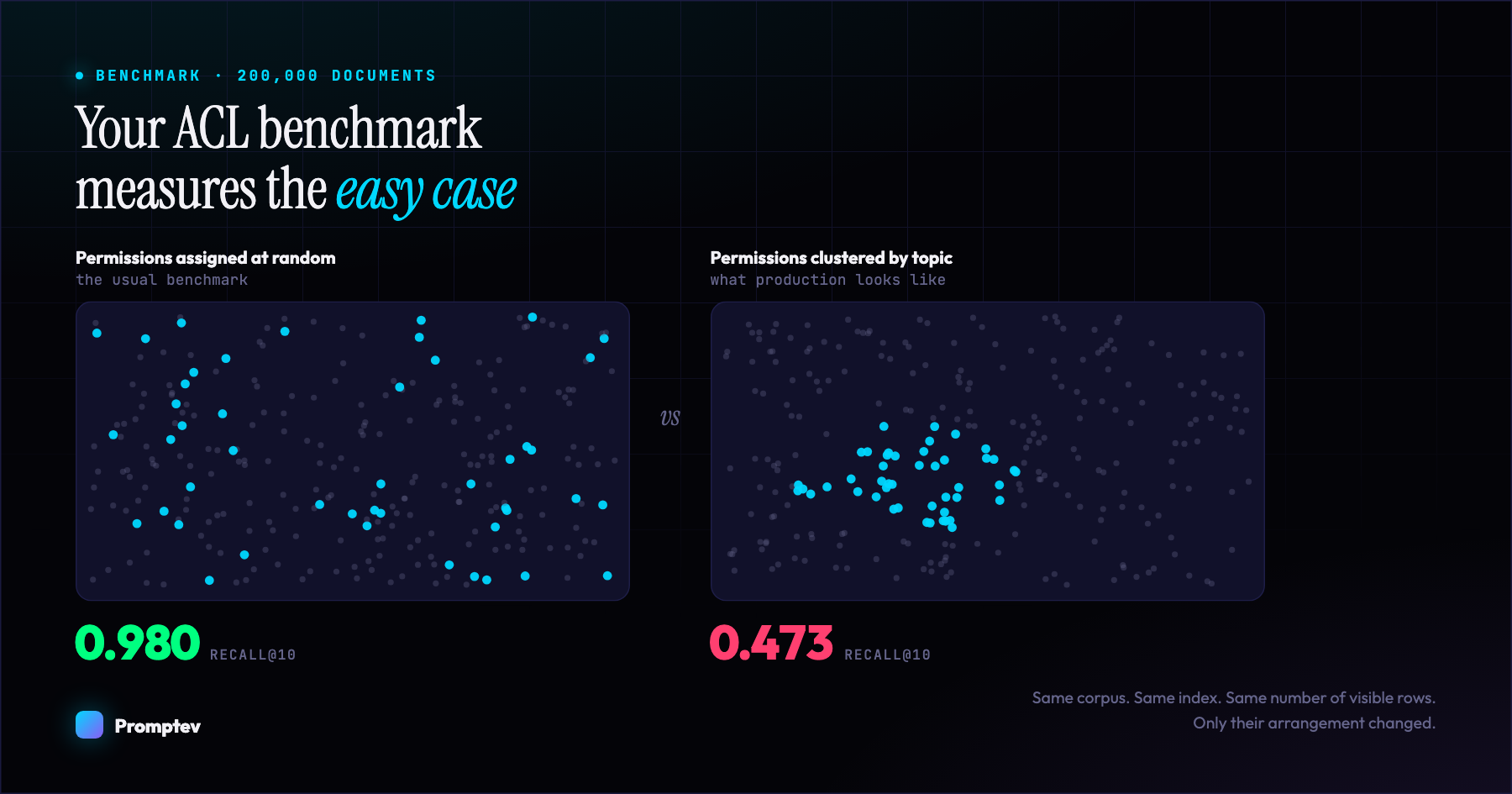
We measured it on 100,000 public documents with synthetic permissions. The corpus, the index, the queries and the number of visible documents are held constant, and only the arrangement of the visible documents changes. For a caller who may see 10% of the corpus, hybrid search filtered after a tenfold fetch:
recovers 0.730 of the results when the permissions are random, and 0.419 when they are team-shaped, with 13.0% of searches returning nothing at all.
At 1% visibility the same tenfold fetch recovers 0.086 with random permissions and 0.021 with team-shaped ones, and 77.0% of searches come back empty.
Nothing errors. Nothing is logged. The results that do come back look entirely reasonable.
This post explains the mechanism, gives the numbers and their conditions, and shows the fix.
The two halves of the problem (only one gets written about)
Search “multi-tenant RAG” and you will find a lot of good writing about the first half:
Half one: not leaking. If you filter in application code, one forgotten if leaks another tenant’s documents. The standard advice is right, and you should follow it: push the check into the database, use PostgreSQL Row-Level Security, make isolation structural and not remembered.
Half two: still finding things. Once the filter is in place, does the query still return what it should? This half is barely discussed, and it is where the silent failure lives. A leak is loud once discovered. An under-returning query looks exactly like “no relevant documents found.”
The rest of this post is about half two.
Why filtering after a search loses results
A search returns a fixed number of results. If the search does not know who is asking, it spends that number on the whole corpus. Filter the list afterwards and what survives is roughly the share the caller may see: ask for ten when one document in ten is visible, and about one result is left. When one in a hundred is visible, most searches are left with none.
The usual answer is to fetch more before filtering. That helps by an amount that depends on where the caller’s documents sit. If they are scattered evenly, a list ten times longer holds about ten of them. If they are a few topics, a query about anything else walks through a long list of other people’s documents first, and ten times longer is not long enough.
The same thing happens one level down, inside an approximate vector index. A WHERE clause on an HNSW scan is applied to the rows the index walk produces. The walk is ordered by distance to the query, rejected rows are discarded as they are met, and the walk stops when its budget is spent. In pgvector that budget is hnsw.ef_search, and it defaults to 40 candidates. Putting the permission in the query is necessary there, and by itself it is not enough.
Three properties make this dangerous:
- It raises no error. An empty result is a valid result. Nothing is logged.
- It is invisible in testing. At full visibility there is no problem at all: the filter rejects nothing, so no part of the limit is wasted. A single-tenant staging environment will never show it.
- It gets worse as security gets tighter. The more carefully you scope access, the worse retrieval becomes for the most-restricted callers.
The measurements
The corpus is 100,000 documents from BEIR HotpotQA (100,646 chunks), embedded with BAAI/bge-small-en-v1.5 at 384 dimensions, in PostgreSQL 16.15 with pgvector 0.8.6 and an HNSW index (m=16, ef_construction=64). The queries are the dataset’s first 200 questions, and they were not chosen to match the visible topics. The search is the promptev Context Engine’s hybrid search at its default settings, asked for ten results.
Three ways of answering the same search are compared:
- Filter after. The search runs with no permissions, and the list is filtered to what the caller may see. It is measured at the same limit (the top 10, filtered), with a tenfold fetch (the top 100, filtered, cut to 10) and with a fiftyfold fetch (the top 500).
- Permissions inside the query. The caller’s group is passed to the search, and the permission predicate runs inside the SQL of every retrieval leg.
- The reference. The same search on a copy of the database that holds only the documents the caller may see, with index scans switched off so that its vector leg is exact. This is what the caller should get.
Recall@10 is the share of the reference’s top ten that a method returned. It is agreement with the visible-only corpus, not relevance. “Empty” is the share of searches where a method returned nothing although the reference had results.
How clustered is built. It is deliberately simple, so that it cannot be accused of being tuned to produce the result. Draw 40 seed documents uniformly at random. Assign every document to its nearest seed by cosine similarity of its embedding (a nearest-centroid partition, not k-means). Then take whole clusters, in random order, until the target count is reached. The visible set is a union of a few topics, a synthetic stand-in for a team’s documents. random draws the same number of documents uniformly. One variable changes. No real permission data was used.
Hybrid search, filtered after the search. Each cell is recall@10 with the share of empty searches in brackets.
Caller sees 10% of the corpus:
| Fetch | Random | Clustered |
|---|---|---|
| Same limit | 0.086 (44.0%) | 0.084 (63.5%) |
| 10x | 0.730 (0.0%) | 0.419 (13.0%) |
| 50x | 0.812 (0.0%) | 0.638 (1.0%) |
Caller sees 1% of the corpus:
| Fetch | Random | Clustered |
|---|---|---|
| Same limit | 0.011 (89.0%) | 0.001 (99.0%) |
| 10x | 0.086 (39.5%) | 0.021 (77.0%) |
| 50x | 0.418 (0.0%) | 0.083 (38.0%) |
Three things to read from it.
At the same limit the two layouts lose about the same. 0.086 against 0.084 at 10% visibility, and 0.011 against 0.001 at 1%. That figure is close to the visible fraction by arithmetic, whatever the layout. What clustering changes there is how the losses are spread: more searches come back with nothing at all, 63.5% against 44.0%.
Fetching more is where the layout decides the outcome. With random permissions a tenfold fetch recovers 0.730 at 10% visibility and leaves no search empty. With clustered permissions the same fetch recovers 0.419. A fiftyfold fetch, the deepest one measured, reaches 0.812 against 0.638. At 1% visibility it reaches 0.418 with random permissions and 0.083 with clustered ones, where 38.0% of searches are still empty. The vector leg on its own shows the same thing more sharply: a tenfold fetch recovers 0.873 with random permissions and 0.467 with clustered ones at 10% visibility, and a fiftyfold fetch 0.995 against 0.817.
A benchmark that assigns permissions at random and over-fetches will report that filtering after the search is nearly safe. It is measuring the easy case.
With the permission inside the query the layout made no difference. For both layouts and both visibility levels, the engine returned the same ten results as the visible-only reference on every one of the 200 searches. That comparison is of the set of ten, not of their order. With 200 searches and no disagreement, up to 1.5% of searches could still differ. Two conditions come with that result: it is agreement with the reference and says nothing about relevance, and the vector leg is exact here because every one of these callers sees fewer than 50,000 chunks. The next section is about that second condition.
The predicate in the query is not enough for the vector leg
The full-text and trigram legs are exact once the predicate is in their SQL. The vector index is approximate, so a predicate on it is still a filter over an index walk.
The promptev Context Engine handles that in two steps. It counts the chunks the search may see, and at or below a threshold (50,000 by default) it sorts those rows exactly. Above the threshold it scans the index with pgvector’s iterative scan and a scan budget sized to the table. The clustered callers in the tables above saw 10,056 and 1,000 chunks and the random callers 10,067 and 1,008, so every one took the exact route.
To see what the exact route removes, the benchmark switches it off:
| Caller | Exact | Off | Forced |
|---|---|---|---|
| Random, sees 10% | 1.000 | 0.978 | 0.978 |
| Clustered, sees 10% | 1.000 | 0.943 | 0.943 |
| Random, sees 1% | 1.000 | 1.000 | 0.961 |
| Clustered, sees 1% | 1.000 | 1.000 | 0.652 |
Recall@10 of the vector leg alone against the visible-only reference. “Exact” is the default, the exact route. “Off” is the exact route switched off with the planner free to choose. “Forced” is the exact route off and the index forced. 200 searches per cell, no empty searches in any.
With the exact route off and the planner free to choose, Postgres picked the vector index at 10% visibility, and recall fell to 0.943 with clustered permissions and 0.978 with random ones. At 1% it picked a sequential scan and sort, which is exact. So without the engine’s routing, whether a query loses recall depends on a cost estimate. That estimate moves with corpus size, dimension, statistics and the scan settings, and should not be read as a rule.
With the index forced, a caller who sees 1% of the corpus through clustered permissions gets a recall of 0.652, against 0.961 with random permissions. The list is full: ten results, and on average 3.5 of them are not among the true nearest ten. This is the loss the exact route exists to remove, and it is silent. Once again the random layout is the easy case.
The exact route is not free. The vector leg took a median 114 ms over the 10,056 visible chunks and 59 ms over 1,000, against 24 ms for an index scan with no predicate. Just under the threshold, at 48,378 visible chunks, it took 337 ms. These are times on one laptop with one query at a time, and they show the size of the cost, not a latency benchmark.
Above the threshold the leg is approximate by default. That was measured with most of the corpus visible: 0.979 at 60% visible and 0.988 at 90% and 100%, which is the approximation of the index itself, since the same index searched with no predicate scores 0.988.
What the benchmark does not show
- Real permissions. The layouts are generated. The clusters are cut in the same embedding space the vector leg searches, which is the hardest layout for that leg. Real permissions follow topic less cleanly, so a real deployment sits somewhere between the two rows.
- Relevance. A recall of 1.000 here means the caller got what a deployment holding only their documents would return. It does not say those results answer the question.
- Narrow access above the threshold. A caller who sees 1% of more than five million chunks also takes the approximate path, with a far more selective predicate than any measured here. The nearest measurement is the forced-index row above, on a much smaller corpus. Nothing is claimed for that case.
- Queries aimed at the caller’s own topics. A caller who searches only for what their own team wrote will find filtering after the search less harmful than these numbers. A caller who searches for anything else will not.
- Anything beyond one dataset, one embedding model and one machine. Each caller holds a single group and every document carries an ACL. Over-fetching beyond fifty times is not measured.
The first version of this post reported an earlier run of the vector index alone, on a bare table and outside the engine. Its raw data was not kept, so it cannot be recomputed, and its figures have been withdrawn from this post. We would rather correct our own benchmark in public than have a reader find it.
How to fix it
1. Put the permission inside the query
Do not search first and filter afterwards. Make the caller’s permissions part of the statement, in every retrieval path you run: full-text, fuzzy matching and vector search alike. For the exact legs that is the whole fix.
2. Turn on iterative scan (pgvector 0.8+)
pgvector 0.8 added iterative index scans, which keep resuming the graph walk until the LIMIT is satisfied or a scan ceiling is reached, instead of giving up when the first budget is spent.
SET LOCAL hnsw.iterative_scan = relaxed_order;Use SET LOCAL, not SET. It is scoped to the current transaction and reverts automatically, so it cannot leak onto a pooled connection and change behaviour for an unrelated later request.
There are two modes. strict_order preserves exact distance ordering, and relaxed_order allows slight local reordering. If your results feed a fusion step that reads rank position and not raw distance, relaxed is usually the better trade: a row missing entirely costs far more than a row two places out of position.
hnsw.max_scan_tuples (default 20,000) bounds the work so a pathological filter cannot walk the entire index. Iterative scan does not remove the loss: with it on and the index forced, recall@10 for a caller who sees 1% was 0.652 with clustered permissions and 0.961 with random ones.
3. Make sure the candidate budget is at least your limit
This one is easy to miss and affects every query, filtered or not:
SET LOCAL hnsw.ef_search = 50; -- must be >= your LIMITef_search defaults to 40. Without iterative scan, an HNSW scan cannot return more rows than its candidate budget, so if you ask for LIMIT 50 you get at most 40: a silent 20% shortfall on every search, with no filtering involved at all. We found exactly this in our own code while investigating the permission problem.
4. Index the column you are filtering on
If your ACL is a PostgreSQL array and you match with the overlap operator, a btree index will not help, because that operator cannot use one:
CREATE INDEX idx_chunks_acl ON chunks USING gin (acl);Without it, the most frequently executed query shape in a multi-tenant deployment is a sequential scan, and it gets slower as the corpus grows.
5. Sort exactly when few rows are visible
When a caller sees a small slice, sorting that slice exactly is both correct and affordable. Count the eligible rows, with a bound so the count never costs more than the scan, and take the exact path under a threshold. This is the step that removed the 0.652.
6. Know which plan you are testing
At small scale the planner may choose an exact scan, which filters perfectly and hides the whole problem. Your test suite can pass while proving nothing:
EXPLAIN ANALYZE
SELECT id FROM chunks
WHERE acl && ARRAY['group:finance']
ORDER BY embedding <=> $1
LIMIT 50;
If the plan says Seq Scan, you are not testing the index. Force the index path in your benchmark, and keep a guard assertion so the test cannot silently degrade later.
How to check your own system in an afternoon
You do not need our benchmark to find out whether this affects you.
- Pick a real query and a real restricted user.
- Run your normal filtered retrieval and record what comes back.
- Run the same query with the vector index disabled (
SET enable_indexscan = off), so Postgres computes the exact answer. - Compare the two lists.
If the exact answer has rows your normal query missed, you have this problem. The gap will be widest for your most-restricted users, which usually means your most sensitive data.
If you are not on pgvector
The mechanism is not specific to pgvector. Any system that applies an access predicate as a filter over an approximate index, or over a finished result list, is filtering after the search, and has some version of this behaviour. What differs is the vocabulary and the escape hatch. Most vector stores expose an equivalent of “search harder when filtering,” and some support pre-filtering, which sidesteps it at a different cost.
The question to ask your vector store is precise: when a filter rejects most candidates, does the engine keep searching, or return short? If the documentation does not answer that, measure it, and measure it with permissions shaped like your teams.
Why this matters more in 2026
Access-controlled retrieval used to be a nice-to-have. Two things changed it.
First, retrieval moved into workflows where being wrong is expensive: support agents quoting policy, analysts querying financials, clinicians reading notes. “No relevant documents found” is not a neutral outcome there. It is a wrong answer delivered confidently.
Second, regulation. The EU AI Act’s Article 12 logging obligations apply to high-risk systems, and the deployer remains accountable regardless of who built the system. If you have to demonstrate that your AI behaved correctly for a given user, “our search silently skipped their documents” is a difficult sentence to write in an audit response.
FAQ
Does Row-Level Security fix this?
No. RLS solves the leaking half correctly, and you should use it, but an RLS policy is still a predicate applied over the index scan. It prevents the wrong rows coming back. It does not make the right ones come back.
Does this affect keyword or full-text search too?
If you filter after the search, yes. In the same benchmark, at 10% visibility with clustered permissions, the full-text leg (with lexical_match="any") filtered after the search at the same limit kept 0.092 of its results and the trigram leg 0.106. A tenfold fetch recovered 0.679 and 0.685. With the predicate inside the query both legs are exact: they returned the same ten results as the visible-only reference on every search, and a separate brute-force check found them in the same order on every query it covers. The vector index is the only approximate one.
Will I notice this in production monitoring?
Almost certainly not, unless you are looking for it. The query succeeds, returns HTTP 200, and produces an empty or short result set. It looks identical to a genuine no-match. The only reliable signal is comparing against an exact answer.
Is iterative scan safe to leave on?
It matters most under tight filters. The cost scales with how much of the index has to be walked, bounded by max_scan_tuples. Enabling it only when a scope filter is present keeps the unfiltered path unchanged.
What if I cannot upgrade pgvector?
Below 0.8 there is no iterative scan. Options: raise ef_search substantially (helps, does not solve), partition by tenant so each tenant’s index is dense in its own rows, or sort the eligible rows exactly when there are few of them. Upgrading is the cleaner answer.
What we did about it
We build the promptev Context Engine, the hosted retrieval behind promptev. It applies the caller’s access rules during every search, so a document a caller may not see is never fetched and never ranked.
That design is what made this bug ours to find. Our own vector search was once filtering over the index walk and returned 0 of 20 matching chunks for a restricted caller in our test fixture. We fixed it, wrote a regression test that fails if it ever comes back, and built the benchmark above, which runs the engine itself, so the claim is measured and not asserted.
In promptev the fix is not something you configure. The caller’s access decides what a search may see: a project API key reads only its own project, and a person in the app sees only what their access allows. From the Python SDK, a search looks like this:
from promptev import PromptevClient

client = PromptevClient(api_key="fk_...")
result = client.search_knowledge_base("search", query="what is our refund window", top_k=10)
The same rule runs through every way of reading the knowledge base (search, document fetch, structured queries and the rest), over the SDKs, the API and MCP alike. How to use it is in the Context Engine documentation.
We are writing this up because the mechanism is general. If you run access-controlled retrieval on any approximate vector index, or filter any search result by permission after the fact, it is worth thirty minutes of your afternoon, whatever you built it with. Run the four-step check above against your own database. The answer is either “no gap” or a number you needed to know.
A benchmark on public data says nothing about the shape of your permissions. Run the check above on your own database, with your real permission values.
More on the Context Engine in the documentation, or talk to us about governed retrieval.

Faisal Saeed is Founder & CEO of promptev, building next-gen context engineering infrastructure that enables teams to orchestrate, scale, and deploy production-ready generative AI systems with confidence.